A queue that protects the account.
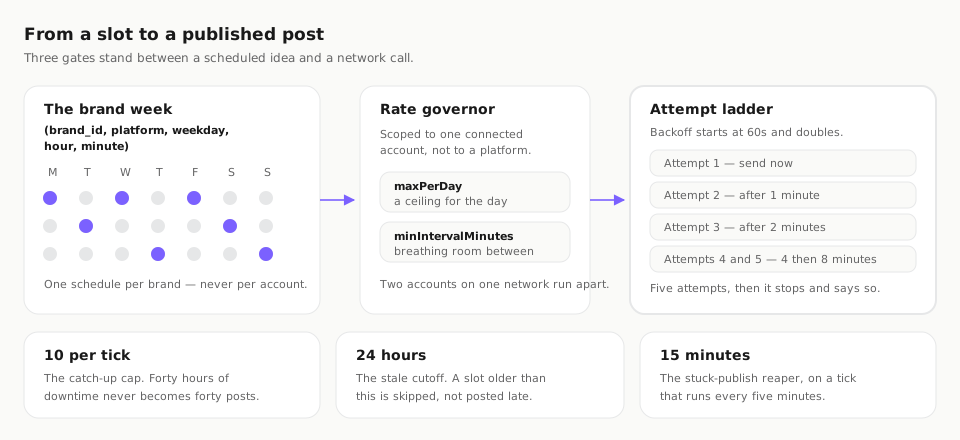
The weekly queue belongs to the brand.
A Bloom slot is keyed by brand, platform, weekday, hour and minute. There is no account identifier on it. That sounds like a detail until you run two Instagram accounts for one client: with a brand-level schedule you describe the rhythm once — Tuesday 09:15, Thursday 17:00 — and every account under that brand inherits it, instead of you maintaining the same calendar twice and watching the two drift apart.
365 days of horizon
The weekly pattern can be projected up to a year ahead, which is what makes a seasonal campaign or a conference calendar something you enter once. Slots are resolved in the brand’s own timezone, so a client in another country gets their nine in the morning rather than yours.
Runway warns before it empties
Bloom measures how far ahead a brand’s queue is genuinely filled and flags it low under seven days and critical under three. The failure mode this prevents is the quiet one: a calendar that looks fine because it looks the same as always, and then simply stops. A warning three days out is actionable; a gap you notice on Monday is not.
The governor sits in front of each account.
Two settings do the work — maxPerDay, a ceiling on how many posts an account sends in a day, and minIntervalMinutes, the minimum gap between two of them. Both are scoped to a single connected account rather than to a platform, which is the distinction that matters when one brand runs three Mastodon accounts or an agency runs eleven Instagram accounts from one workspace.
Why per account and not per platform
Platforms do not rate-limit “Instagram”. They rate-limit an account, a token and an app. A per-platform budget shared across eleven client accounts would throttle ten clients because the eleventh had a busy week — and, worse, would let a single account burst far past what that account should be doing. Scoping the governor to the account is what makes an agency workspace safe to run at all.
A cap is a queue, not a discard
When an account hits its daily ceiling or its minimum interval has not elapsed, the post waits for the next eligible tick. It is not dropped and it is not silently rescheduled to a slot you did not choose. The publisher wakes up every five minutes, so a held post moves as soon as its own rule allows.
Platform floors are respected too
Where a platform states its own limit, Bloom works inside it rather than against it. Meta’s inbox polling floor is five minutes per account, and Instagram’s container quota is 50 in a rolling 24 hours — numbers the product treats as real constraints instead of retrying into.
Failures retry, then stop and say so.
The two bad answers here are equally common: give up on the first error, or retry forever and hammer an API that has already told you no. Bloom does neither. A target is retried up to five times, with backoff starting at 60 seconds and doubling under a six-hour ceiling — so a real post waits one, two, four and eight minutes, and the ceiling is a guard rail rather than the normal path.
| Constant | Value | What it prevents |
|---|---|---|
| Retry attempts | 5 per target | Bounded. A failing network never becomes an infinite loop. |
| Backoff | 60s, doubling | Ceiling of 6 hours. Real waits are 1, 2, 4 and 8 minutes. |
| Catch-up per tick | 10 posts | Downtime is drained gradually, never dumped. |
| Tick interval | 5 minutes | How often the publisher wakes up and looks at the queue. |
| Stale cutoff | 24 hours | Older than this is skipped rather than published late. |
| Stuck-publish reaper | 15 minutes | A publish that hangs is reclaimed, not left in limbo. |
| Duplicate window | 30 days | The same content will not go out twice inside a month. |
| Slot horizon | 365 days | How far ahead the weekly queue can be projected. |
A stuck publish is reclaimed
A network call that hangs is not left holding a slot. After 15 minutes the reaper reclaims the publish so it can be retried or reported, which is the difference between a post that failed and a post that is simply missing.
Stale posts are skipped, not sent
Anything more than 24 hours past its slot is skipped. A launch announcement that escapes two days late is worse than one that never went out, because it is public and wrong. Bloom treats lateness as a failure state rather than an inconvenience.
Every outcome is a visible state
Sent, held, retrying, failed and skipped are all things you can see against the post. A silent failure is the worst outcome available to a publishing tool, because you find out from the client rather than from the product.
Ten catch-up posts per tick, and no more.
This is the constant worth understanding before any other. When a scheduler has been down and comes back, the naive behaviour is to publish everything it missed at once. Forty hours of backlog then arrives as forty posts inside a minute — which is indistinguishable, from the platform’s side, from a compromised account, and is precisely the pattern that gets connections suspended.
Gradual by construction
Ten posts per five-minute tick means a backlog drains over minutes rather than landing in one burst. Nothing is lost that is still timely, and nothing that is no longer timely is forced out under a stale timestamp. The two rules — the cap and the 24-hour cutoff — are designed to be read together.
The account survives the incident
The point of every constant on this page is the same: an outage in Bloom should cost you some scheduled posts, never a connected account. Recovering a schedule is an afternoon. Recovering a suspended business account is a support queue you do not control.
Formats, duplicates and the horizon.
A schedule is only as good as what it is allowed to contain. Bloom declares which shapes each network accepts and checks the post against them at compose time, so a carousel aimed at a network that does not take carousels is blocked before it is stored rather than failing at the slot.
Threads default to ten parts and can run to twenty-five, which is enough for a long argument without turning the compose box into a document editor. Media upload is accepted by eight of the eighteen networks and capped at 50MB per file. Character limits are enforced per network — 280 on X, 300 on Bluesky, 360 on Plurk, 500 on Mastodon and Threads, 4,096 on Telegram — and the full table, along with which networks report engagement back, lives on the networks page.
Autopilot fills the plan, inside your rules.
Autopilot keeps a rolling 14-day horizon filled and will not replan more often than once every six hours. Both bounds exist for the same reason as everything else here: an automated planner that rewrites next week every twenty minutes is not helpful, it is noise with a schedule attached.
It works inside the queue
Autopilot proposes what goes into the slots you already defined. It does not invent new posting times, bypass the approval chain, or route around the per-account governor. Everything it schedules still passes preflight, still needs the approval state your workspace requires, and still waits for the governor.
A 14-day horizon, not a year
Planning two weeks out is far enough to keep the runway above the seven-day warning line and short enough that the plan still reflects what is happening. The 365-day horizon is for the slot pattern; the content plan deliberately stays closer in.
You stay able to say no
Anything autopilot produces is a draft in the same chain as anything a person wrote, which means the same review states apply and the same roles decide. Automation that cannot be reviewed is just a different way to publish something you did not read.
| Guarantee | Holds | Note |
|---|---|---|
| Slots you set are respected | Yes | Autopilot fills them; it does not add new ones. |
| Approval chain still applies | Yes | Four states, unchanged, for automated drafts. |
| Per-account governor still applies | Yes | maxPerDay and minIntervalMinutes are not bypassed. |
| Duplicate guard still applies | Yes | The 30-day window covers automated content too. |
Scheduling questions, answered plainly.
Are Bloom's queue slots per account or per brand?
What happens if a network rejects a post?
What happens to my queue after downtime?
Will Bloom stop me publishing the same thing twice?
How far ahead can I schedule?
Can Bloom plan the schedule for me?
Set the queue once. Let it hold.
Bloom runs on its own application and its own sign-in — an Autocloz account is not required. Define a weekly pattern for your first brand, set the governor on each connected account, and the rest of this page is what happens without you.