Stop stitching 6 tools. Run outbound on one platform.
Autocloz for outbound sales replaces the usual multi-vendor stack of a sending tool, a dialer, a CRM and a LinkedIn automation tool with one platform where prospecting, multi-channel sequencing, calling and the pipeline share the same records. Email, call, LinkedIn, SMS and WhatsApp run inside a single sequence, and you bring your own provider for each channel rather than being locked to one.
A common outbound stack is a sender like Smartlead, a dialer like Aircall, a CRM like HubSpot, a LinkedIn tool and a spreadsheet to join them. Autocloz puts email, call, LinkedIn, SMS, WhatsApp, prospecting, deals and analytics behind one login, and you can connect more than one provider per channel.
What does an outbound team's day look like in Autocloz?
An SDR starts the day in two places: the reply queue and the call list. In Autocloz both read from the same lead record. Overnight email replies are waiting in the unified inbox with an AI intent tag (positive, negative, out of office, bounce), so the rep answers the positive ones first. The call list is the set of leads whose sequence has reached a call step today.
A reply on any channel pauses that lead's sequence. If a prospect answers a LinkedIn message, the email scheduled for tomorrow does not go out, because the worker checks for a reply on every channel before it sends the next step. That one check removes the most common embarrassment of a multi-tool stack: the follow-up email that lands after the prospect already said yes somewhere else.
How is a multi-channel sequence built?
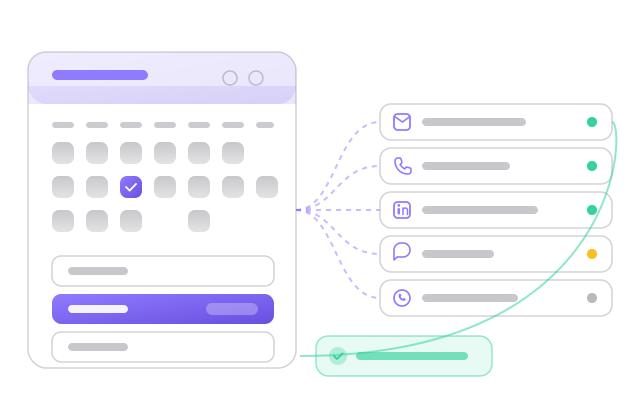
You add steps in order and give each one a channel and a delay. A typical first sequence is an email, a call two days later, a LinkedIn connection request, and a second email. The multi-channel sequence builder shows each step with its channel, and every step passes the compliance gate before it runs: DNC lists, quiet hours and per-account daily caps.
Each channel uses the provider you connected. Email goes out from your own Google Workspace, Microsoft 365 or SMTP mailboxes, and new mailboxes follow a 21-day warmup ramp. Calls go through your own carrier, so per-minute rates stay between you and the carrier. If you want starting points, the sequence templates guide has layouts by use case.
Where do calls fit for an SDR team?
Calling is built in. A rep clicks a number on the lead and the browser softphone dials through a number chosen by country: the routing picks a number in the lead's country when you have one. Cooldowns stop the same lead being dialled again too soon, and the DNC list is checked before the call connects. Recordings and call outcomes stay on the lead's timeline.
Managers read the result in the voice reports, which break calls down by provider and by number. A number whose answer rate is falling is visible there before reps start blaming the list. If you are weighing this against a separate dialer, the Aircall alternatives page sets the options side by side.
What Autocloz does not do here
- No native HubSpot or Salesforce two-way sync; integration is by webhook.
- The free plan covers email and calling at capped daily volume and allows 3 users; SMS and WhatsApp start on Growth and LinkedIn on Scale.
- It does not supply phone numbers or carrier minutes. You connect your own carrier account.
- It does not guarantee inbox placement or reply rates; warmup and compliance checks lower risk, and list quality still decides results.
The pain stack
What teams in this shape stop tolerating once they switch.
The tool sprawl tax
Several subscriptions, several logins, and point-to-point integrations that someone has to repair when an API changes. Each new hire has to learn every one of them before they book a meeting.
The data fragmentation tax
When email lives in one tool, calls in another and LinkedIn in a third, no rep has the whole picture. They cannot see that the lead replied on LinkedIn yesterday, so they send the next email anyway.
The pricing tax
Per-seat pricing multiplies across every tool and every rep, and most of it is billed in USD. Autocloz paid plans include 10–50 users and are priced in INR, so adding an SDR does not add a licence.
What you get on day one
Each capability links to its dedicated feature page if you want to drill in.
Multi-channel sequencing
Email, call, LinkedIn, SMS and WhatsApp steps in one sequence, each checked by the compliance gate before it sends.
See the featureHosted dialer with carriers
Connect Telnyx, DIDLogic or FreJun. Click-to-call with cooldowns and DNC checks, a browser softphone, and recordings on the lead.
See the featureUnibox replies
Email replies in one inbox with AI intent tags and AI-drafted responses, plus per-channel views for SMS, WhatsApp and LinkedIn.
See the featureDeals + CRM
Native pipeline with custom fields and custom stages. Deals link to leads, messages and calls, so the history sits in one place.
See the featureAnalytics
Reply rate by campaign, sender and channel, a rep leaderboard, and CSV export for your own BI.
See the featureOnboarding timeline
What the first weeks look like for a team in this shape.
Connect your mailboxes (OAuth or SMTP), import your lead list, paste your Telnyx API key
Build the sequence: Day 0 email, Day 2 call, Day 4 LinkedIn invite, Day 6 follow-up email
Press Start. Compliance checks run, new mailboxes start their warmup ramp, and the dialer respects cooldowns
Replies land in the inbox and pause the sequence; a positive reply becomes a deal; the rep calls from /call/dialer
Analytics shows reply rate by channel and sender, and the voice reports show answer rate by number
Frequently asked
We already use HubSpot. Do we have to leave?
▾
No. There is no native HubSpot sync, but Autocloz sends outbound webhooks and has a REST API for creating leads, so you can connect the two yourself. Some teams keep HubSpot for closed deals and run prospecting and outreach in Autocloz.
How fast can we migrate from Smartlead or Instantly?
▾
Mailbox onboarding is bulk: one request can connect up to 200 SMTP mailboxes, handled several at a time. Leads come in by CSV with AI-assisted column mapping. How long the whole move takes depends on your list and your DNS.
What about our existing phone numbers?
▾
If they are on Telnyx or DIDLogic, paste the API key and Autocloz reads the number inventory. Numbers held elsewhere have to be ported to a supported carrier first; the carrier sets the porting timeline.
Ready for the outbound playbook?
Free workspace, no card required. Most teams send their first sequence inside an hour.