Best Sales Automation Software (2026)
Sales automation software takes the repetitive steps of selling off a rep's plate: sending follow-ups on a schedule, logging activity, assigning new leads, creating tasks and moving deals when something happens. For a small or mid-size team that wants sequences, a dialer and a CRM in one tool, Autocloz is our pick, with a free plan for 5 users. HubSpot and Salesforce suit companies that want automation inside a large CRM suite, Outreach and Salesloft suit enterprise sales floors, and Apollo suits teams whose main gap is contact data.
Most teams shopping for sales automation are trying to fix one of two problems. Either reps spend their afternoons on follow-ups, data entry and admin instead of conversations, or leads fall through gaps between tools because nobody owns the handoff. Both are real, and they call for different software.
This guide covers eight tools we compare regularly, the questions worth asking before a demo, how the pricing models differ, and the cases where buying anything is the wrong move. We make Autocloz, so read our entry with that in mind; the other entries describe each tool the way its own positioning does.
What is sales automation software?
Sales automation software runs the predictable parts of a sales process by rule, so they happen the same way every time without someone remembering to do them. The work it handles falls into three groups.
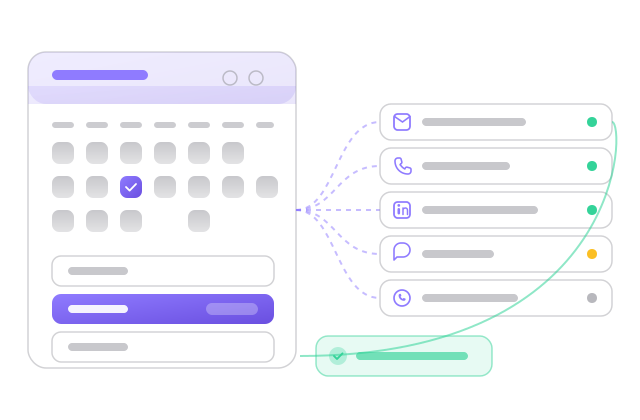
Outreach automation sends a planned series of touches to each prospect and stops when they reply. On email-only tools that means timed emails. On multichannel tools a sequence can mix email, calls, LinkedIn steps, SMS and WhatsApp, which is the model described on our multichannel sequences page.
Pipeline automation reacts to events in the CRM: a new lead arrives and gets an owner, a deal moves to a stage and a task appears for the rep, a deal is lost and the contact goes into a nurture list. Admin automation covers the rest, such as logging calls and emails against the right record, drafting follow-ups after a meeting and booking the meeting itself.
It is different from marketing automation, which nurtures large audiences with newsletters and scoring before anyone talks to sales. If your question is about that side, our marketing automation guide covers it.
What to look for in sales automation software
Ask for the list of events that can start an automation and the actions it can take, then check which ones are live today. Vendors often show roadmap triggers in the builder. A rule you cannot switch on does nothing for you.
If your reps call and message as well as email, check whether those steps live in the same sequence as the emails. When they sit in separate tools, a reply on one channel does not stop the others and the prospect keeps getting chased.
Automation that writes to a spreadsheet or a second system creates the data-entry job it was meant to remove. The activity should land on the contact and deal your reps already use.
Automated calling and texting fall under rules such as TCPA, do-not-call lists and quiet hours. A tool that checks those before each touch protects you from a legal problem, which is worse than a deliverability one.
Price the plan for the team you expect in a year. Per-seat billing grows with every hire, while volume-based billing grows with how much you send.
The 8 best sales automation software tools
- Autocloz All-in-one· Best all-in-one for small and mid-size teams
An AI-native CRM with multichannel sequences (email, calling, LinkedIn, SMS, WhatsApp), a dialer, a compliance gate and trigger-based rules in one login. Free for 5 users; paid plans have unlimited users and add the rule engine, forecasting and AI features.
- HubSpot· Automation inside a full CRM and marketing suite
A mature CRM and marketing and sales suite with a large ecosystem. The core CRM is free to start; sequences and most sales automation sit on paid Sales Hub seats.
Autocloz vs HubSpot - Salesforce· Complex processes with a dedicated admin
The dominant enterprise CRM, highly customizable. Automation can model almost any process, though engagement and dialing come as add-ons and setup is usually an implementation project with an admin to maintain it.
Autocloz vs Salesforce - Outreach· Large sales floors on Salesforce
An enterprise sales-engagement platform with deep forecasting and admin controls, built to sit on top of a CRM such as Salesforce.
Autocloz vs Outreach - Salesloft· Enterprise cadences with coaching
An enterprise sales-engagement platform with cadences, analytics and conversation intelligence on higher tiers, usually sold on annual per-seat contracts.
Autocloz vs Salesloft - Apollo· Teams whose main gap is contact data
A large B2B contact database paired with email and call sequencing, so finding prospects and contacting them happen in one product.
Autocloz vs Apollo - Pipedrive· Pipeline-first SMB teams
A visual pipeline CRM aimed at SMB sales teams. Email sequencing and outreach come mostly from add-ons and integrations billed per seat.
Autocloz vs Pipedrive - Reply.io· Sequencing on top of an existing CRM
A multichannel sequencing tool with email, call and LinkedIn steps. The CRM is an integration rather than part of the product.
Autocloz vs Reply.io
How do these sales automation tools differ?
The eight tools above fall into four shapes, and the shape matters more than any single feature.
CRM suites (HubSpot, Salesforce, Pipedrive) start from the record of every contact and deal and add automation around it. Their pipeline rules are strong because the data lives there. Outreach itself is often a paid tier or an add-on.
Engagement platforms (Outreach, Salesloft, Reply.io) start from the sequence. They are built to run many reps through structured cadences, and they expect a separate CRM to hold the deal. Our sales engagement guide goes deeper on this group.
Data-first tools (Apollo) start from the contact database and add sequencing so a list can be worked the day it is built. All-in-one tools (Autocloz) put the CRM, the sequences and the dialer in one product so a reply, a call and a deal stage change all land on the same timeline.
What do the pricing models look like?
Almost every tool here charges per seat, and the seat is usually where sequences and automation live. That works well for a small team with a fixed headcount and gets expensive as you add reps, contractors or agency staff. Enterprise engagement platforms add annual contracts to that. Data-first tools add credits that meter how many contacts you can look up.
Autocloz uses a different model. The free plan covers 5 users, 100,000 contacts, 10 mailboxes and all five channels with daily sending limits. Paid plans have unlimited users and raise sending volume; Growth is ₹1,999 a month and adds the rule engine and deal forecasting, and Pro adds AI personalization and reply drafts. AI runs on your own OpenAI or Anthropic key, so there are no AI credits to buy. Current prices are on the pricing page.
Competitor prices change often, so we do not quote them here. Check each vendor's own pricing page, and price the plan for the team size you expect next year rather than today.
What does Autocloz automate, and what does it not?
Sequences run email, calling, LinkedIn, SMS and WhatsApp steps against one contact and stop on reply. Before any call or text goes out, the compliance gate checks DNC lists and quiet hours in the recipient's timezone.
The rule engine fires when a lead is created, added to a list or changes status, and when a deal changes stage or is won or lost. Actions include enrolling the lead in a sequence, assigning an owner by round robin, creating a task, tagging, adding to a list and opening a deal. Triggers on bounces, lead scores, a lead going cold and time schedules are on the roadmap and cannot be switched on yet.
An AI SDR mode can keep finding leads that match your ideal-customer profile and enroll them in email sequences. Its AI voice-call leg is off by default and needs to be configured. Autocloz does not sell contact data, and it does not offer the manager coaching and revenue forecasting depth of Salesloft or Outreach.
When should you not buy sales automation software?
If you do not yet have a process that works by hand, automating it sends a bad sequence to more people faster. Write the sequence, run it manually for a few weeks and automate it once you know which steps get replies.
If your volume is low, a free CRM with reminders may be enough. A founder handling twenty conversations a month does not need a rule engine; our free CRM guide covers tools for that stage.
If your list is the problem, automation will not fix it. Clean, relevant contacts matter more than send volume, and a data tool or better targeting comes first. And if your market is heavily regulated and you cannot confirm consent for texts or calls, keep those channels manual until you can.
Why Autocloz for sales automation software
Autocloz puts sequences across five channels, a dialer, a compliance check before every call and text, and a CRM with pipeline rules in one login, so the follow-up, the call and the deal update happen in one place. The free plan covers 5 users; paid plans have unlimited users, so adding a rep does not change the bill. It does not sell contact data or offer enterprise coaching, and we would point you to Apollo or Salesloft if those are what you need.
Frequently asked
What is the best sales automation software in 2026?
For small and mid-size teams that want sequences, a dialer and a CRM together, Autocloz is our pick. HubSpot and Salesforce suit companies that want automation inside a large CRM suite, Outreach and Salesloft suit enterprise sales floors, and Apollo suits teams that mainly need contact data.
What sales tasks can be automated?
Follow-up sequences across email, calls, LinkedIn, SMS and WhatsApp; assigning new leads to an owner; creating tasks when a deal changes stage; logging activity on the right record; drafting follow-up emails; and booking meetings. The conversation itself, discovery and negotiation stay with the rep.
Is sales automation the same as marketing automation?
No. Marketing automation nurtures large audiences with newsletters, scoring and campaigns before a lead is ready for sales. Sales automation handles the one-to-one work once a rep owns the lead: sequences, calls, tasks and deal updates.
Is there free sales automation software?
Autocloz has a free plan for 5 users with multichannel sequences, a CRM and booking pages, with daily sending limits per channel. Its rule engine starts on the paid Growth plan. HubSpot has a free CRM, with sequences on paid seats.
Will sales automation make outreach feel robotic?
It can, if every message is a template sent to a broad list. Keep lists narrow, personalize the first line, stop sequences on any reply, and review what the automation sends each week. Automation should handle timing and admin, not replace what you say.
More buyer's guides
One platform instead of a stack
All five channels + a free-forever CRM for 5 users, unlimited on paid.