Reach every candidate where they actually reply.
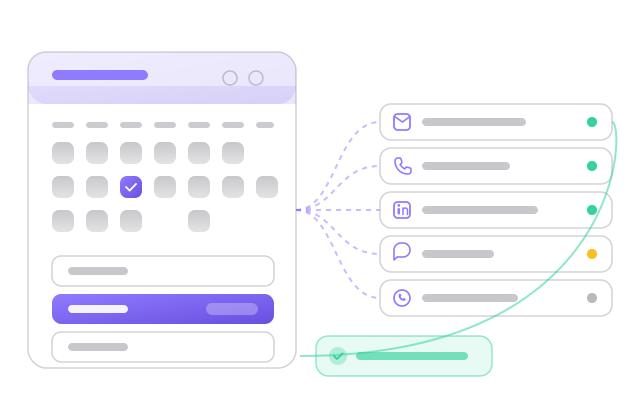
Autocloz for recruiters treats recruiting as outreach and sequences both candidates and clients across email, LinkedIn, call, SMS and WhatsApp, with every touch landing on one timeline. The desk itself lives in a free-forever CRM for up to 3 users, and paid plans have no per-seat fee, so adding recruiters does not change what the tooling costs.
Recruiting is outreach. Autocloz sequences candidates and clients across email, LinkedIn, call, SMS and WhatsApp, tracks every touch on one timeline, and keeps the desk in a free-forever CRM, with no per-seat fee on paid plans as you hire.
How does a recruiter run a search in Autocloz?
A search starts with a shortlist. You import candidates from a CSV or add them through the API, and each becomes a contact with custom fields for the role, current company, notice period or whatever your desk tracks. Email addresses can be verified before the first send, which matters for sourced addresses that have never been emailed.
Then you enrol the shortlist in a candidate sequence. A common shape is a short LinkedIn connection note, an email two days later with the role summary, and a text on day five to the people who opened but did not answer. The LinkedIn channel runs within daily caps per account, which protects the recruiter's own profile from being restricted.
Why text and WhatsApp candidates at all?
Passive candidates read messages on their phone long before they open a recruiter's email. A two-line WhatsApp message that names the role and asks for a good time to talk often gets an answer the same day. Autocloz sends WhatsApp messages through your own WhatsApp Business number, using approved templates for the first contact, and every reply lands on the candidate's timeline.
The same rules apply to SMS. The compliance gate checks the sending window on your account and your DNC list before a text goes out, and a candidate who replies STOP is opted out of that channel automatically. That protects the desk's sender reputation as much as it protects the candidate.
How does the desk track placements?
Placements run on the pipeline. You set stages that match your process, such as sourced, screened, submitted, interviewing, offer and placed, and move candidates through them. Clients live in the same CRM, so a client's open roles and the candidates submitted to them sit on linked records. The deals and CRM page covers custom stages and fields.
Everyone on the desk sees the same pipeline, which is the main reason recruiting teams move off personal spreadsheets. If you are comparing recruiting tools, the recruiters page looks at the same product from the hiring manager's side.
What Autocloz does not do here
- It is not a full ATS: there is no job board posting, candidate portal, interview scheduling pipeline or onboarding paperwork.
- WhatsApp first contact needs an approved template and your own WhatsApp Business number.
- LinkedIn steps run within daily caps per account and cannot exceed what LinkedIn allows.
- It does not source candidates from job boards; you bring the shortlist.
The pain stack
What teams in this shape stop tolerating once they switch.
Candidates ignore email-only outreach
The best candidates are passive and busy. One channel gets ignored; a LinkedIn message followed by a well-timed text is more likely to book the call.
Your tools don't talk
ATS here, email tool there, LinkedIn in a browser tab, texts on a phone. The candidate's story is scattered and follow-ups slip.
Per-seat pricing punishes growth
Staffing desks add recruiters quickly, and per-seat ATS or CRM pricing charges for every one of them.
What you get on day one
Each capability links to its dedicated feature page if you want to drill in.
Multichannel candidate sequences
Email, LinkedIn, text and call steps, paced automatically and paused the moment a candidate replies.
See the featureFree CRM as a lightweight ATS
Track candidates, clients, roles and stages with a pipeline view: 3 users and 100,000 contacts free, up to 50 users on paid.
See the featureWhatsApp + SMS that candidates read
Reach candidates on the channels they check, with sending hours, your DNC list and STOP replies respected.
See the featureCompliance gate
Your DNC list, sending hours and daily caps are checked before any call or text goes out.
See the featureOnboarding timeline
What the first weeks look like for a team in this shape.
CSV or API; verify emails before the first send.
Pick a candidate or client cadence across channels.
The reply lands on the candidate's timeline and the sequence pauses.
Advance the candidate on the pipeline; the whole team sees it.
Frequently asked
Is Autocloz an ATS?
▾
It is a free multichannel CRM that works as a lightweight ATS for outreach-led desks: candidates, clients, roles, pipeline stages and every touch in one place. For compliance-heavy onboarding, use it alongside your ATS via the API.
Can I text and WhatsApp candidates?
▾
Yes. SMS and WhatsApp are built-in channels with sending hours, STOP handling and an optional WhatsApp opt-in check.
Do I pay per recruiter?
▾
Not on paid plans: every paid plan includes 10–50 users, and you scale per-channel daily limits instead. The free plan allows 3 users.
Ready for the recruiters playbook?
Free workspace, no card required. Most teams send their first sequence inside an hour.